Tampilkan postingan dengan label Wordpress Look. Tampilkan semua postingan

Senin, 29 September 2014

CityNews


CityNews blogger template


TEMPLATE FEATURES

 Instructions URL How to
install Blogger Template
 Template Author
Lasantha Bandara
 Designer Newwpthemes.com
 Descriptions

CityNews Blogger Template features: 2 Sidebar, 3 Column, 4 Column footer,
Adapted from Wordpress, Blue, Elegant, Featured Section, Fixed width, Fresh,
Grey, Magazine, Premium, Right Sidebar, Slider, Tabbed widget, Top Navigation
Bar, Web 2.0, White


Configure Featured Content Slider:

Go to "Template" --> "Edit HTML" of your blog. Find <!-- Featured Content Slider Started -->. Now scroll down slowly and you can see each featured slide codes between <div class='fp-slides-items'> and </div>.
Now replace,
* "This is default featured post X title" with your featured post title.
* "#" with your featured post URL.
* "Go to Blogger edit html and find these sentences.Now replace these sentences with your own descriptions. This theme is Bloggerized by Lasantha Bandara - Premiumbloggertemplates.com." with your slider description.
* Slider image address with your slider image.

How To Change Tab Names of Tab Widget:

Find this in "Edit HTML":


If you want to change your tab names of your tab widget then find this:


Now change the names "Popular", "Tags" and "Blog Archives" as you like.
<ul class='tabs-widget tabs-widget-widget-themater_tabs-1432447472-id'>
<li><a href='#widget-themater_tabs-1432447472-id1'>Popular</a></li>
<li><a href='#widget-themater_tabs-1432447472-id2'>Tags</a></li>
<li><a href='#widget-themater_tabs-1432447472-id3'>Blog Archives</a></li>
</ul>


Rabu, 11 Desember 2013

Active


Active blogger template


TEMPLATE FEATURES

 Instructions URL How to
install Blogger Template
 Template Author
Lasantha Bandara
 Designer Newwpthemes.com
 Descriptions

Active Blogger Template features: 1 Sidebar, 2 Column, 4 Column footer,
Adapted from Wordpress, Elegant, Featured Section, Fixed width, Fresh, Grey,
Header Banner, Magazine, Orange, Premium, Right Sidebar, Slider, Tabbed widget,
Top Navigation Bar, Web 2.0, White


Configure Featured Content Slider:

Go to "Template" --> "Edit HTML" of your blog. Find <!-- Featured Content Slider Started -->. Now scroll down slowly and you can see each featured slide codes between <div class='fp-slides-items'> and </div>.
Now replace,
* "This is default featured post X title" with your featured post title.
* "#" with your featured post URL.
* "Go to Blogger edit html and find these sentences.Now replace these sentences with your own descriptions. This theme is Bloggerized by Lasantha Bandara - Premiumbloggertemplates.com." with your slider description.
* Slider image address with your slider image.

How To Change Tab Names of Tab Widget:

Find this in "Edit HTML":


If you want to change your tab names of your tab widget then find this:


Now change the names "Popular", "Tags" and "Blog Archives" as you like.
<ul class='tabs-widget tabs-widget-widget-themater_tabs-1432447472-id'>
<li><a href='#widget-themater_tabs-1432447472-id1'>Popular</a></li>
<li><a href='#widget-themater_tabs-1432447472-id2'>Tags</a></li>
<li><a href='#widget-themater_tabs-1432447472-id3'>Blog Archives</a></li>
</ul>


DoMag


DoMag blogger template


TEMPLATE FEATURES

 Instructions URL How to
install Blogger Template
 Template Author
Lasantha Bandara
 Designer Newwpthemes.com
 Descriptions

DoMag Blogger Template features: 2 Sidebar, 3 Column, 3 Column footer,
Adapted from Wordpress, Blue, Elegant, Featured Section, Fixed width, Fresh,
Header Banner, Magazine, Orange, Pink, Premium, Right Sidebar, Slider, Tabbed
widget, Top Navigation Bar, Web 2.0, White, Yellow


Configure Featured Content Slider:

Go to "Template" --> "Edit HTML" of your blog. Find <!-- Featured Content Slider Started -->. Now scroll down slowly and you can see each featured slide codes between <div class='fp-slides-items'> and </div>.
Now replace,
* "This is default featured post X title" with your featured post title.
* "#" with your featured post URL.
* "Go to Blogger edit html and find these sentences.Now replace these sentences with your own descriptions. This theme is Bloggerized by Lasantha Bandara - Premiumbloggertemplates.com." with your slider description.
* Slider image address with your slider image.

How To Change Tab Names of Tab Widget:

Find this in "Edit HTML":


If you want to change your tab names of your tab widget then find this:


Now change the names "Popular", "Tags" and "Blog Archives" as you like.
<ul class='tabs-widget tabs-widget-widget-themater_tabs-1432447472-id'>
<li><a href='#widget-themater_tabs-1432447472-id1'>Popular</a></li>
<li><a href='#widget-themater_tabs-1432447472-id2'>Tags</a></li>
<li><a href='#widget-themater_tabs-1432447472-id3'>Blog Archives</a></li>
</ul>


Kamis, 05 Desember 2013

Cinemax


Cinemax blogger template


TEMPLATE FEATURES

 Instructions URL How to
install Blogger Template
 Template Author
Lasantha Bandara
 Designer Newwpthemes.com
 Descriptions

Cinemax Blogger Template features: 2 Sidebar, 3 Column, 3 Column footer,
Adapted from Wordpress, Black, Elegant, Featured Section, Fixed width, Fresh,
Magazine, Premium, Red, Right Sidebar, Slider, Tabbed widget, Top Navigation
Bar, Web 2.0, White, Movies, Games


Configure Featured Content Slider:

Go to "Template" --> "Edit HTML" of your blog. Find <!-- Featured Content Slider Started -->. Now scroll down slowly and you can see each featured slide codes between <div class='fp-slides-items'> and </div>.
Now replace,
* "This is default featured post X title" with your featured post title.
* "#" with your featured post URL.
* "Go to Blogger edit html and find these sentences.Now replace these sentences with your own descriptions. This theme is Bloggerized by Lasantha Bandara - Premiumbloggertemplates.com." with your slider description.
* Slider image address with your slider image.

How To Change Tab Names of Tab Widget:

Find this in "Edit HTML":


If you want to change your tab names of your tab widget then find this:


Now change the names "Popular", "Tags" and "Blog Archives" as you like.
<ul class='tabs-widget tabs-widget-widget-themater_tabs-1432447472-id'>
<li><a href='#widget-themater_tabs-1432447472-id1'>Popular</a></li>
<li><a href='#widget-themater_tabs-1432447472-id2'>Tags</a></li>
<li><a href='#widget-themater_tabs-1432447472-id3'>Blog Archives</a></li>
</ul>


Senin, 19 Agustus 2013

Posted


Posted blogger template


TEMPLATE FEATURES

 Instructions URL How to
install Blogger Template
 Template Author
Lasantha Bandara
 Designer Newwpthemes.com
 Descriptions

Posted Blogger Template features: 1 Sidebar, 2 Column, 4 Column footer,
Adapted from Wordpress, Blue, Elegant, Featured Section, Fixed width, Grey,
Header Banner, Magazine, Premium, Right Sidebar, Slider, Tabbed widget, Top
Navigation Bar, Web 2.0, White


Configure Featured Content Slider:

Go to "Template" --> "Edit HTML" of your blog. Find <!-- Featured Content Slider Started -->. Now scroll down slowly and you can see each featured slide codes between <div class='fp-slides-items'> and </div>.
Now replace,
* "This is default featured post X title" with your featured post title.
* "#" with your featured post URL.
* "Go to Blogger edit html and find these sentences.Now replace these sentences with your own descriptions. This theme is Bloggerized by Lasantha Bandara - Premiumbloggertemplates.com." with your slider description.
* Slider image address with your slider image.

How To Change Tab Names of Tab Widget:

Find this in "Edit HTML":


If you want to change your tab names of your tab widget then find this:


Now change the names "Popular", "Tags" and "Blog Archives" as you like.
<ul class='tabs-widget tabs-widget-widget-themater_tabs-1432447472-id'>
<li><a href='#widget-themater_tabs-1432447472-id1'>Popular</a></li>
<li><a href='#widget-themater_tabs-1432447472-id2'>Tags</a></li>
<li><a href='#widget-themater_tabs-1432447472-id3'>Blog Archives</a></li>
</ul>


Senin, 29 Juli 2013

Newsly


Newsly blogger template


TEMPLATE FEATURES

 Instructions URL How to
install Blogger Template
 Template Author
Lasantha Bandara
 Designer Newwpthemes.com
 Descriptions

Newsly Blogger Template features: 1 Sidebar, 2 Column, 3 Column footer,
Adapted from Wordpress, Elegant, Featured Section, Fixed width, Fresh, Grey,
Header Banner, Magazine, Premium, Red, Right Sidebar, Slider, Tabbed widget, Top
Navigation Bar, Web 2.0, White


Configure Featured Content Slider:


Go to "Template" --> "Edit HTML" of your blog. Find <!-- Featured Content Slider Started -->. Now scroll down slowly and you can see each featured slide codes between <div class='fp-slides-items'> and </div>.
Now replace,
* "This is default featured post X title" with your featured post title.
* "#" with your featured post URL.
* "Go to Blogger edit html and find these sentences.Now replace these sentences with your own descriptions. This theme is Bloggerized by Lasantha Bandara - Premiumbloggertemplates.com." with your slider description.
* Slider image address with your slider image.

How To Change Tab Names of Tab Widget:

Find this in "Edit HTML":


If you want to change your tab names of your tab widget then find this:


Now change the names "Popular", "Tags" and "Blog Archives" as you like.
<ul class='tabs-widget tabs-widget-widget-themater_tabs-1432447472-id'>
<li><a href='#widget-themater_tabs-1432447472-id1'>Popular</a></li>
<li><a href='#widget-themater_tabs-1432447472-id2'>Tags</a></li>
<li><a href='#widget-themater_tabs-1432447472-id3'>Blog Archives</a></li>
</ul>


MovieMag


MovieMag blogger template


TEMPLATE FEATURES

 Instructions URL How to
install Blogger Template
 Template Author
Lasantha Bandara
 Designer Newwpthemes.com
 Descriptions

MovieMag Blogger Template features: 1 Sidebar, 2 Column, 3 Column footer,
Adapted from Wordpress, Artworks, Blue, Elegant, Featured Section, Fixed width,
Fresh, Header Banner, Magazine, Premium, Right Sidebar, Slider, Tabbed widget,
Top Navigation Bar, Web 2.0, White, Movies


Configure Featured Content Slider:


Go to "Template" --> "Edit HTML" of your blog. Find <!-- Featured Content Slider Started -->. Now scroll down slowly and you can see each featured slide codes between <div class='fp-slides-items'> and </div>.
Now replace,
* "This is default featured post X title" with your featured post title.
* "#" with your featured post URL.
* "Go to Blogger edit html and find these sentences.Now replace these sentences with your own descriptions. This theme is Bloggerized by Lasantha Bandara - Premiumbloggertemplates.com." with your slider description.
* Slider image address with your slider image.


How To Change Tab Names of Tab Widget:

Find this in "Edit HTML":


If you want to change your tab names of your tab widget then find this:


Now change the names "Popular", "Tags" and "Blog Archives" as you like.
<ul class='tabs-widget tabs-widget-widget-themater_tabs-1432447472-id'>
<li><a href='#widget-themater_tabs-1432447472-id1'>Popular</a></li>
<li><a href='#widget-themater_tabs-1432447472-id2'>Tags</a></li>
<li><a href='#widget-themater_tabs-1432447472-id3'>Blog Archives</a></li>
</ul>


Wordie


Wordie blogger template


TEMPLATE FEATURES

 Instructions URL How to
install Blogger Template
 Template Author
Lasantha Bandara
 Designer Newwpthemes.com
 Descriptions

Wordie Blogger Template features: 1 Sidebar, 2 Column, 3 Column footer,
Adapted from Wordpress, Elegant, Featured Section, Fixed width, Green, Header
Banner, Magazine, Premium, Right Sidebar, Slider, Tabbed widget, Top Navigation
Bar, Web 2.0, White


Configure Featured Content Slider:


Go to "Template" --> "Edit HTML" of your blog. Find <!-- Featured Content Slider Started -->. Now scroll down slowly and you can see each featured slide codes between <div class='fp-slides-items'> and </div>.
Now replace,
* "This is default featured post X title" with your featured post title.
* "#" with your featured post URL.
* "Go to Blogger edit html and find these sentences.Now replace these sentences with your own descriptions. This theme is Bloggerized by Lasantha Bandara - Premiumbloggertemplates.com." with your slider description.
* Slider image address with your slider image.

How To Change Tab Names of Tab Widget:

Find this in "Edit HTML":


If you want to change your tab names of your tab widget then find this:


Now change the names "Popular", "Tags" and "Blog Archives" as you like.
<ul class='tabs-widget tabs-widget-widget-themater_tabs-1432447472-id'>
<li><a href='#widget-themater_tabs-1432447472-id1'>Popular</a></li>
<li><a href='#widget-themater_tabs-1432447472-id2'>Tags</a></li>
<li><a href='#widget-themater_tabs-1432447472-id3'>Blog Archives</a></li>
</ul>


PressHub


PressHub blogger template


TEMPLATE FEATURES

 Instructions URL How to
install Blogger Template
 Template Author
Lasantha Bandara
 Designer Newwpthemes.com
 Descriptions

PressHub Blogger Template features: 1 Sidebar, 2 Column, 3 Column footer,
Adapted from Wordpress, Blue, Elegant, Featured Section, Fixed width, Fresh,
Magazine, Premium, Red, Right Sidebar, Slider, Tabbed widget, Top Navigation
Bar, Web 2.0, White


Configure Featured Content Slider:


Go to "Template" --> "Edit HTML" of your blog. Find <!-- Featured Content Slider Started -->. Now scroll down slowly and you can see each featured slide codes between <div class='fp-slides-items'> and </div>.
Now replace,
* "This is default featured post X title" with your featured post title.
* "#" with your featured post URL.
* "Go to Blogger edit html and find these sentences.Now replace these sentences with your own descriptions. This theme is Bloggerized by Lasantha Bandara - Premiumbloggertemplates.com." with your slider description.
* Slider image address with your slider image.


How To Change Tab Names of Tab Widget:

Find this in "Edit HTML":


If you want to change your tab names of your tab widget then find this:


Now change the names "Popular", "Tags" and "Blog Archives" as you like.
<ul class='tabs-widget tabs-widget-widget-themater_tabs-1432447472-id'>
<li><a href='#widget-themater_tabs-1432447472-id1'>Popular</a></li>
<li><a href='#widget-themater_tabs-1432447472-id2'>Tags</a></li>
<li><a href='#widget-themater_tabs-1432447472-id3'>Blog Archives</a></li>
</ul>


Institute


Institute blogger template


TEMPLATE FEATURES

 Instructions URL How to
install Blogger Template
 Template Author
Lasantha Bandara
 Designer Newwpthemes.com
 Descriptions

Institute Blogger Template features: 1 Sidebar, 2 Column, 3 Column
footer, Adapted from Wordpress, Blue, Elegant, Featured Section, Fixed width,
Fresh, Header Banner, Magazine, Premium, Right Sidebar, Slider, Tabbed widget,
Top Navigation Bar, Web 2.0, White, Yellow


Configure Featured Content Slider:


Go to "Template" --> "Edit HTML" of your blog. Find <!-- Featured Content Slider Started -->. Now scroll down slowly and you can see each featured slide codes between <div class='fp-slides-items'> and </div>.
Now replace,
* "This is default featured post X title" with your featured post title.
* "#" with your featured post URL.
* "Go to Blogger edit html and find these sentences.Now replace these sentences with your own descriptions. This theme is Bloggerized by Lasantha Bandara - Premiumbloggertemplates.com." with your slider description.
* Slider image address with your slider image.


How To Change Tab Names of Tab Widget:

Find this in "Edit HTML":


If you want to change your tab names of your tab widget then find this:


Now change the names "Popular", "Tags" and "Blog Archives" as you like.

<ul class='tabs-widget tabs-widget-widget-themater_tabs-1432447472-id'>
<li><a href='#widget-themater_tabs-1432447472-id1'>Popular</a></li>
<li><a href='#widget-themater_tabs-1432447472-id2'>Tags</a></li>
<li><a href='#widget-themater_tabs-1432447472-id3'>Blog Archives</a></li>
</ul>


Kamis, 25 Juli 2013

Oceanus


Oceanus blogger template


TEMPLATE FEATURES

 Instructions URL How to
install Blogger Template
 Template Author

NewBloggerThemes
 Designer fabthemes.com
 Descriptions

Oceanus Blogger Template features: 1 Sidebar, 2 Column, 4 Column footer,
Adapted from WordPress, Blue, Elegant, Featured Section, Fixed width, Fresh,
Green, Magazine, Premium, Right Sidebar, Slider, Top Navigation Bar, Web 2.0,
White


How To Configure Dropdown Menu:

Find this in "Edit HTML"


Replace "#" symbol with real URLs and anchors (like Finance, Religion, ...) with your own words.

<ul class='sfmenu' id='nbtheme'>
<li><a href='#'>Finance</a></li>
<li><a href='#'>Religion</a></li>
<li><a href='#'>Sports</a></li>
<li>
<a href='#'>Business</a>
<ul class='sub-menu'>
<li><a href='#'>Aciform</a></li>
<li><a href='#'>Asmodeus</a></li>
</ul>
</li>
<li><a href='#'>Politics</a></li>
<li>
<a href='#'>Entertainment</a>
<ul class='sub-menu'>
<li><a href='#'>Art</a></li>
<li><a href='#'>Vintage</a></li>
</ul>
</li>
</ul>


How To Configure Slider:

Find this in "Edit HTML":


Replace,


ENTER-SLIDE-X-LINK-HEREs with real slide links.


Enter Slide X Titles with real slide titles.


Slider image URLs with your own image link


<!--Subscribe starts-->
<h4>Sign up here to be one of the first to know when it&#39;s ready.</h4>
<ul class='slides'>
<li>
<a href='ENTER-SLIDE-1-LINK-HERE'><img src='https://blogger.googleusercontent.com/img/b/R29vZ2xl/AVvXsEhU8REG-amuQJXPmEp6FWIHQHVgHzm2TIf1vsJFxTqZtEElUDhB2i54deJUD7Dy11xzSHiqcccE73oSH9MfMo1xq080-bJne0Y_oslB5MKiPvm4xlVpn_vIxAlS93dSnhiwB3A03pEy4y4/s1600/slide-1.jpg'/></a>
<div class='flex-caption'>
<h2>Enter Slide 1 Title</h2>
</div>
</li>
<li>
<a href='ENTER-SLIDE-2-LINK-HERE'><img src='https://blogger.googleusercontent.com/img/b/R29vZ2xl/AVvXsEhfMh5UnwvviVeUiT-fyCFANgfwIElvzbzKBFbld5HJedDLdqC9lk3AUTD2QHNzB5bIksGHVYpYDC88_4uhTEsrRyxHdSc6BtJaQDIYYmGKbjKBLHoK5At8-Y-RlPhso8HVjArIaIuhy_A/s1600/slide-2.jpg'/></a>
<div class='flex-caption'>
<h2>Enter Slide 2 Title</h2>
</div>
</li>
<li>
<a href='ENTER-SLIDE-3-LINK-HERE'><img src='https://blogger.googleusercontent.com/img/b/R29vZ2xl/AVvXsEh9OuojW9ujg5xfZss9mi9Jjx3yWJz-705JjwXQfbkOI-c9EDzGXDcCTwEB5mrd9mw5feuxbtWZ9HUPkYOsQ5wgm3hzP5gk6CSXTW8asauVI_fJyvqo2O3LwyNyAPPkgmihLLDvBjUwagc/s1600/slide-3.jpg'/></a>
<div class='flex-caption'>
<h2>Enter Slide 3 Title</h2>
</div>
</li>
<li>
<a href='ENTER-SLIDE-4-LINK-HERE'><img src='https://blogger.googleusercontent.com/img/b/R29vZ2xl/AVvXsEj8XX77NOTpryStMEVKV7eZixUpuYU_u9QnjwrZTjAei0ARXsBYdL5LqCkeAPms5ceymrzgDMKR4cV006uPslSEWSoX3KGBdra6Icqwa-9ZMR9sVTeO8rjeLlDg-j6HUF45dYayK41qEtE/s1600/slide-4.jpg'/></a>
<div class='flex-caption'>
<h2>Enter Slide 4 Title</h2>
</div>
</li>
<li>
<a href='ENTER-SLIDE-5-LINK-HERE'><img src='https://blogger.googleusercontent.com/img/b/R29vZ2xl/AVvXsEg5wRSMQbRnXWgFlu74qCsRr9WtP-Lrp2ymU3DgJtaXPXErQ4USWDgHjDyJC4Y106QfRnffgcE-hjz7tEKAklVWnTceb4SBJ0UvGIA1haI71Hs5nSWmmPwE5NwhDCmRjyUisOPt4Zb_OuI/s1600/slide-5.jpg'/></a>
<div class='flex-caption'>
<h2>Enter Slide 5 Title</h2>
</div>
</li>
<li>
<a href='ENTER-SLIDE-6-LINK-HERE'><img src='https://blogger.googleusercontent.com/img/b/R29vZ2xl/AVvXsEjXZ93DFVV6eMQfTa_BuhLmkE0-vp9Kh4rQHQLXbKm2EWYOenzdiGrM-paCQHciuVdxTO04FYUWFdDGoDTPQVSjYHvN8EjBvwKvQsuEqTJQS5Xq0oaW_JbGaabbwZbelPcH68wErlaMKE0/s1600/slide-6.jpg'/></a>
<div class='flex-caption'>
<h2>Enter Slide 6 Title</h2>
</div>
</li>
<li>
<a href='ENTER-SLIDE-7-LINK-HERE'><img src='https://blogger.googleusercontent.com/img/b/R29vZ2xl/AVvXsEgyv8JOuOSORaIiTF18o6AZX94dTpU1aUeYuzEV_Nbja5cRd-O5SVIFmWPC5yE8V4OUjOWl5SOLH8qMjbnKMUtUdPED6vaNmm9J3BwNSsZ_7ID72q_kwh0DXSARd3jHuHaRw9U5wNZQXIg/s1600/slide-7.jpg'/></a>
<div class='flex-caption'>
<h2>Enter Slide 7 Title</h2>
</div>
</li>
<li>
<a href='ENTER-SLIDE-8-LINK-HERE'><img src='https://blogger.googleusercontent.com/img/b/R29vZ2xl/AVvXsEgQpmLHUJSy7X3Il2oTYr9CsKhdz-wD-Q2M2qm-wZAgx7ykOsTt2H4QUb59i8uewxkLhey8KqbQ7UQ_Kl2U5d4yFXEhyphenhyphenPOfvtg7arLATjJxYfCYAgkqPiSp_HKCoXUSVrfRyYEwvhpnQBI/s1600/slide-8.jpg'/></a>
<div class='flex-caption'>
<h2>Enter Slide 8 Title</h2>
</div>
</li>
<li>
<a href='ENTER-SLIDE-9-LINK-HERE'><img src='https://blogger.googleusercontent.com/img/b/R29vZ2xl/AVvXsEi12Ij-WJDS1AWljwryeF1KrI_hMQ-LP3juiqgijjdwK9pFaYZdqZw_TwfBdWDf5IFZ9J9OGF9xi7NdF4qbqt19fU72cVL9w2mX4nZpBC7R5b78AkPVgr90mc_gJjiEvVeFsEoLaoR0_AI/s1600/slide-9.jpg'/></a>
<div class='flex-caption'>
<h2>Enter Slide 9 Title</h2>
</div>
</li>
</ul>


Selasa, 16 Juli 2013

SuvZen


SuvZen blogger template


TEMPLATE FEATURES

 Instructions URL How to
install Blogger Template
 Template Author
Lasantha Bandara
 Designer Newwpthemes.com
 Descriptions

SuvZen Blogger Template features: 2 Sidebar, 3 Column, Adapted from
WordPress, Black, Elegant, Featured Section, Fixed width, Fresh, Header Banner,
Left Sidebar, Magazine, Premium, Red, Right Sidebar, Slider, Tabbed widget, Top
Navigation Bar, Web 2.0, White


BusinessHub


BusinessHub blogger template


TEMPLATE FEATURES

 Instructions URL How to
install Blogger Template
 Template Author
Lasantha Bandara
 Designer Newwpthemes.com
 Descriptions

BusinessHub Blogger Template features: 1 Sidebar, 2 Column, 3 Column
footer, Adapted from Wordpress, Blue, Elegant, Featured Section, Fixed width,
Fresh, Header Banner, Magazine, Premium, Right Sidebar, Slider, Tabbed widget,
Top Navigation Bar, Web 2.0, White, Yellow


HealthMag


HealthMag blogger template


TEMPLATE FEATURES

 Instructions URL How to
install Blogger Template
 Template Author
Lasantha Bandara
 Designer Newwpthemes.com
 Descriptions

HealthMag Blogger Template features: 1 Sidebar, 2 Column, 4 Column
footer, Adapted from Wordpress, Elegant, Featured Section, Fixed width, Fresh,
Green, Magazine, Nature, Premium, Right Sidebar, Slider, Tabbed widget, Top
Navigation Bar, Web 2.0, White


Senin, 15 Juli 2013

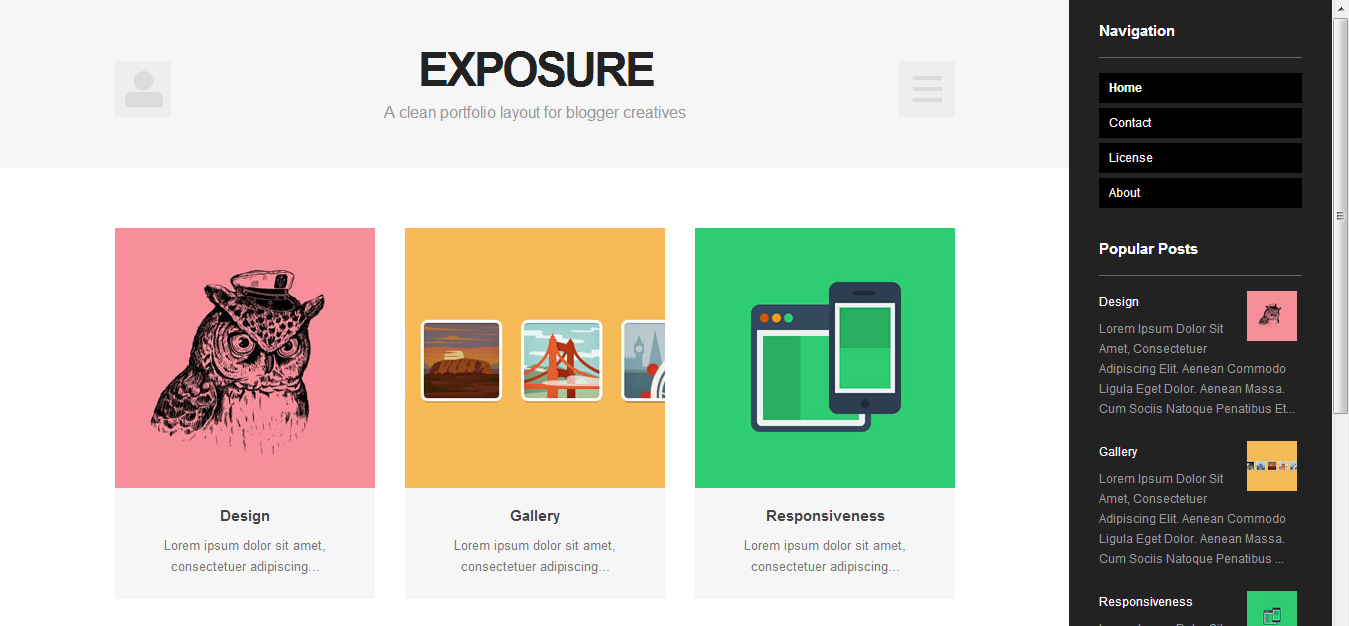
Exposure Blogger Template

Exposure Blogger Template
More About Exposure Blogger Template
Platform Type Blogger / Blogspot
Template Name Exposure Blogger Template
DescriptionsExposure Blogger Template is a gallery style clean blogger template, white and black color base theme with 1 right sidebar, default theme sidebar not showing, sidebar design using jquery show / off button.Gallery style Blogger Template.theme left selection design for social profiles, this Exposure Blogger Template design for Portfolio Blogger blog's
Template Authorhttp://www.bloggerzbible.com/
Designerjdsans
Instructions URL How to install Blogger Template correctly ? How To Install a Blogger Template In New Blogger Interface
Tags search Exposure Blogger Template
Exposure Blogspot Template
Exposure B Template
Exposure Blogger Theme
Exposure Blogspot Theme
Exposure B Theme

Minggu, 07 Juli 2013

Dcm V2 Spring Green Blogger Template

Dcm V2 Spring Green Blogger Template
More About Dcm V2 Spring Green Blogger Template
Platform Type Blogger / Blogspot
Template Name Dcm V2 Spring Green Blogger Template
DescriptionsDcm V2 Spring Green Blogger Template is a Modern and powerful Blogger Template. Its Full Design using Java scripts, And Quality Looks.Green, Black And Gray color Used For This theme Design, Sidebar Placed Left side and sidebar widgets design using jquery switch style. this theme design for personal and photography related blogger blog's. you can use this Dcm V2 Spring Green Blogger Template as your portfolio site
Template Authorhttp://urang-kurai.blogspot.com
Designerurang kurai
Instructions URL How to install Blogger Template correctly ? How To Install a Blogger Template In New Blogger Interface
Tags search Dcm V2 Spring Green Blogger Template
Dcm V2 Spring Green Blogspot Template
Dcm V2 Spring Green B Template
Dcm V2 Spring Green Blogger Theme
Dcm V2 Spring Green Blogspot Theme
Dcm V2 Spring Green B Theme

Kamis, 04 Juli 2013

TheJournal


TheJournal blogger template


TEMPLATE FEATURES

 Instructions URL How to
install Blogger Template
 Template Author
Lasantha Bandara
 Designer Newwpthemes.com
 Descriptions

TheJournal Blogger Template features: 2 Sidebar, 3 Column, 3 Column
footer, Adapted from Wordpress, Elegant, Featured Section, Fixed width, Fresh,
Grey, Header Banner, Magazine, Premium, Red, Right Sidebar, Slider, Tabbed
widget, Top Navigation Bar, Web 2.0, White


MagHub


MagHub blogger template


TEMPLATE FEATURES

 Instructions URL How to
install Blogger Template
 Template Author
Lasantha Bandara
 Designer Newwpthemes.com
 Descriptions

MagHub Blogger Template features: 1 Sidebar, 2 Column, 3 Column footer, Adapted
from Wordpress, Blue, Elegant, Featured Section, Fixed width, Fresh, Header
Banner, Magazine, Orange, Premium, Right Sidebar, Slider, Tabbed widget, Top
Navigation Bar, Web 2.0, White


Kamis, 27 Juni 2013

WarmMag - Premium Blogger Template

WarmMag - Premium Responsive Blogger Template
More About WarmMag Blogger Template
Platform Type Blogger / Blogspot
Template Name WarmMag Blogger Template
DescriptionsWarmMag is a clean and modern Blogger Template. Its 2 Column Magazine Style Blogger Template With 1 Right sidebar, Theme Header Design as a 2 Column Area. So Header Right Side have 468Px ads banner,dual top menu Links With Auto Convert Drop Down list to on mobile device. 4 Column Footer area Available. Half Page Image Slider and Tabs Widgets Design Using Jquery, Every Post Footers Have Social Share Widget. User's Can Share Your Post Using One Click.Finaly WarmMag Blogger Template Is a Full Completed Blogger Temple
Template AuthorLasindu Nadishan
Designerhttp://www.coolbthemes.com/
Instructions URL How to install Blogger Template correctly ? How To Install a Blogger Template In New Blogger Interface
Tags search WarmMag Blogger Template Blogger Template
WarmMag Blogger Template Blogspot Template
WarmMag Blogger Template B Template
WarmMag Blogger Template Blogger Theme
WarmMag Blogger Template Blogspot Theme
WarmMag Blogger Template B Theme

eHealth


eHealth blogger template


TEMPLATE FEATURES

 Instructions URL How to
install Blogger Template
 Template Author
Lasantha Bandara
 Designer Newwpthemes.com
 Descriptions

1 Sidebar, 2 Column, 3 Column footer, Adapted from Wordpress, Blue, Elegant,
Featured Section, Fixed width, Fresh, Header Banner, Magazine, Premium, Right
Sidebar, Slider, Tabbed widget, Top Navigation Bar, Web 2.0, White


Design by Free WordPress Themes | Bloggerized by Lasantha - Premium Blogger Themes | Best Web Hosting